skip to main |
skip to sidebar

Where have we been lately? There's been no posts in almost a month (give or take). Well, for most of that time I've just been lazy, but for ten days we were running around the great state of Maine. It helps to have friends. Doris has reconnected with someone we went to high school (a long time ago) with. She just happens to have a house in Maine, on the ocean, with a direct view of Cadillac Mountain in Acadia National Park. For the second year she's just tossed us the key to the front door and said "go have fun". We did. We spent seven days at her beautiful place. (Thanks J.) We've been going to Maine every October for at least the past ten years and before that we'd go at other times of the year. There's been two "bucket list" targets in Maine for a while now. One was shooting West Quoddy Head Lighthouse and the other checking out (and shooting) Baxter State Park. Got to do both this year and I'm guessing you can tell today's image is not from the lighthouse. To see how the colors were drawn out of today's image, hit the "Read More".
Read more!
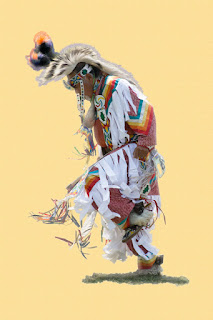 I'm reasonably good at making Masks. I use Adobe Photoshop's (PS) Quick Selection Tool (W) and Topaz Labs' Remask and PS's Calculations. Whatever is the best tool for the task at hand. But, sometimes things slip through the cracks or are too much trouble to bother with. Take a look at today's image. There's a lot of fringe down at the bottom of the dancer's regalia. The background was a mess. People standing around, other dancers, banners, tents, evergreen boughs, speakers, and all sorts of other "stuff". The fringe wasn't a big problem to extract. The big deal was tiny tips of the feathers and pom-pom in the headdress. To find out what the solution was (at least the solution I used) to "getting" the detail, hit the "Read More".
Read more!
Well, it's that time of the year again. Time for Scott Kelby's World Wide Photowalk. I've participated in each year's walk. Six as a walk leader (this will be the seventh) and last year we were attendees in two walks while we were in Maine. One in the morning in Acadia National Park and an evening walk around Boothbay Harbor. You can see the result of both places in one image if you look back through about a year's worth of posts. This year I'm back to leading a walk. A group that has been fairly faithful walkers asked me why I wasn't leading a walk last year and encouraged me to resume this year. They've traveled a fair distance to be walkers, but I guess this year I pushed it too far. Just in case you're curious and don't recognize the skyline in today's image, find out where our walk is this year by hitting the "Read More".
Read more!
I run into a lot (okay, some) people who are doing what's known as a 365 Project. You can find many examples of such tasks on Flickr or some of the other social photography sites. The trick is to take at least one photo every day for an entire year. It is a good idea to live someplace that has beautiful clouds or sunsets every day, but most people don't live in Shangri-La or other Edenistic locales, Most of us live in the real world. Today's image gives those of us in not so pristine climates a chance to keep the momentum going. It's simple to do and comes up with unique images. I say unique because no two images are ever the same. To learn what this "secret" technique might be, hit the "Read More".
Read more!
Okay, in today's image you can see that "the background" isn't exactly a big distraction. In fact, it isn't. It isn't anything. It was never there. Adobe Photoshop (PS) really had nothing to do with what you're looking at. Just about everyone knows the bane of a photographers existence is a bald sky. That is usually the case. But, in today's image it works to our advantage. The local Garden Conservancy had an "open garden" this past weekend. Naturally we rallied the troops and got some friends out shooting in the garden. It's a beautiful, private garden that is only opened once a year. Proceeds go to the Garden Conservancy, so the few bucks to get in is well spent. To find out "the secret" to today's image, hit the "Read More".
Read more!
This will be the second post in a row dealing with getting rid of distracting backgrounds. If you haven't seen the other post I'd suggest you might want to check it out. Today's image goes in the direct opposite direction. Instead of doing all sorts of tricks to hide the background, today's image just plain eliminates "most" of it. The only piece of the background left is the shadow. (Sort of like the Cheshire Cat.) It would have been nice if I'd had the chance to shoot this fellow on a seamless white background and be done with it. Unfortunately, he was in the middle of a dance circle with other dancers and people milling around in the background. It made for an okay snapshot, but nothing to make it "an image". For a couple of ideas about how to get rid of a difficult background, hit the "Read More".
Read more!

Any time you're at any kind of festival, what's behind your subject of interest becomes important. If your objective is getting a head shot you probably don't have too much to worry about (if you have a long enough lens). Set your F-stop as low as it will go, focus on the eyes and let the background be totally out of focus. If the plan is to get a full length shot (as in today's image) your problems multiply. Even the fastest glass can only do so much. The things that are conspiring against you are your minimum F-stop number (largest aperture), the distance between you and the subject and the distance between the subject and the background. If you look back a couple of posts you'll see a head shot of a friend. He was about half the distance of today's image away, but the background was about two hundred feet behind him. Therefore, the background was fully out of focus. In what started out as today's image, the fellow was probably sixty feet from me, but the people standing in the background were about sixty feet further back. They were definitely not "in focus", but what they were was still recognizable. That gives a good starting point for a montage. To find out about a few of Adobe Photoshop's (PS) extraction tools, hit the "Read More".
Read more!


 I'm reasonably good at making Masks. I use Adobe Photoshop's (PS) Quick Selection Tool (W) and Topaz Labs' Remask and PS's Calculations. Whatever is the best tool for the task at hand. But, sometimes things slip through the cracks or are too much trouble to bother with. Take a look at today's image. There's a lot of fringe down at the bottom of the dancer's regalia. The background was a mess. People standing around, other dancers, banners, tents, evergreen boughs, speakers, and all sorts of other "stuff". The fringe wasn't a big problem to extract. The big deal was tiny tips of the feathers and pom-pom in the headdress. To find out what the solution was (at least the solution I used) to "getting" the detail, hit the "Read More".





 Posts
Posts


